Vision
A Vision Language Model reads an image and text together. yzma sends both with the pkg/mtmd package.
Before you start
A VLM needs two files. Download both:
yzma model get -u https://huggingface.co/ggml-org/Qwen2.5-VL-3B-Instruct-GGUF/resolve/main/Qwen2.5-VL-3B-Instruct-Q8_0.gguf
yzma model get -u https://huggingface.co/ggml-org/Qwen2.5-VL-3B-Instruct-GGUF/resolve/main/mmproj-Qwen2.5-VL-3B-Instruct-Q8_0.gguf
The file with mmproj in the name is the projector. It turns the image into tokens that the model reads.
Run the example
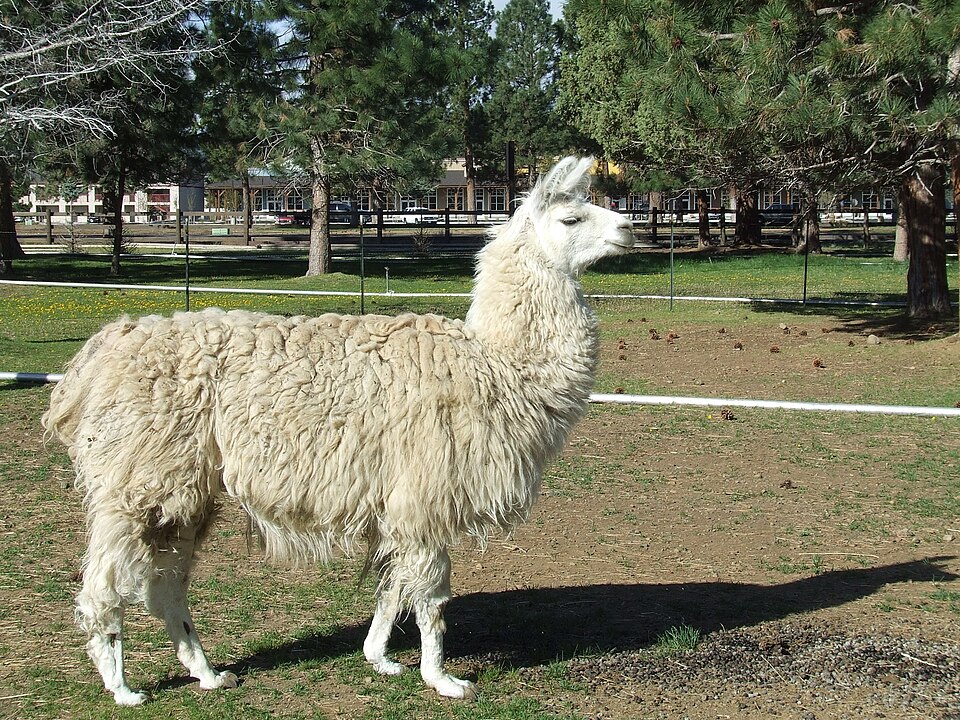
$ go run ./examples/vlm/ -model ~/models/Qwen2.5-VL-3B-Instruct-Q8_0.gguf -mmproj ~/models/mmproj-Qwen2.5-VL-3B-Instruct-Q8_0.gguf -image ./images/domestic_llama.jpg -p "What is in this picture?"

The image features a white llama standing in a fenced-in area, possibly a zoo or a farm. The llama is positioned in the center of the image, with its body facing the right side. The fenced area is surrounded by trees, creating a natural environment for the llama.
The steps
1. Load the multimodal library and the projector.
mtmd.Load(libPath)

mctxParams := mtmd.ContextParamsDefault()
mtmdCtx, err := mtmd.InitFromFile(projFile, model, mctxParams)
defer mtmd.Free(mtmdCtx)
2. Put the image marker in the prompt.
The model needs to know where the image goes in the text. mtmd.DefaultMarker gives that marker.
messages = append(messages, llama.NewChatMessage("user", mtmd.DefaultMarker()+prompt))
mtmd.GetMarker(mtmdCtx) returns the marker for a specific model.
3. Read the image.
bitmap := mtmd.BitmapInitFromFile(mtmdCtx, imageFile, false, mtmd.InitOptDefault())
defer mtmd.BitmapFree(bitmap.Bitmap)
4. Tokenize the text and the image together.
output := mtmd.InputChunksInit()
defer mtmd.InputChunksFree(output)

input := mtmd.NewInputText(chatTemplate(true), true, true)
mtmd.Tokenize(mtmdCtx, output, input, []mtmd.Bitmap{bitmap.Bitmap})
5. Run the chunks through the model.
var n llama.Pos
mtmd.HelperEvalChunks(mtmdCtx, lctx, output, 0, 0, int32(ctxParams.NBatch), true, &n)
n is the new position in the context. Use it as the start of the generation loop.
6. Take the answer with the normal loop.
The rest is the same as a text model, with Decode, SamplerSample, and TokenToPiece.
Check what the model accepts
if mtmd.SupportVision(mtmdCtx) {
	// The model reads images.
}
There are also SupportAudio and SupportVideo.
Describe an image from a URL
The describe example takes a remote URL or a local file:
go run ./examples/describe/ -models=/home/ron/models/ -v https://example.com/photo.jpg
You can also install it as a command:
go install github.com/hybridgroup/yzma/examples/describe@latest
Speed
An image takes much more work than text. The projector runs once for each image. On a CPU this takes half a minute or more. On a GPU it takes a second or two.
Use a GPU for a program that reads images. See Hardware acceleration.
Next steps
- Multimodal shows audio and video.
- Models lists the Vision Language Models with the command for each one.